This bundle includes the Red Pitaya STEMlab 125-14 PRO Gen 2 Starter Kit and the new book "Experimenting with Red Pitaya STEMlab Gen 2".
The Red Pitaya STEMlab 125-14 PRO Gen 2 Starter Kit is a powerful and flexible platform for signal processing, data acquisition, and electronic measurement applications. Designed for engineers, developers, researchers, and educators, this kit provides everything required to start building advanced measurement and control systems.
At the core of the kit is the STEMlab 125-14 PRO Gen 2 board, an upgraded and ultra-lightweight development platform. Powered by the Xilinx Zynq-7010 SoC with 512 MB of RAM, it combines FPGA programmability with ARM processing power to enable high-performance instrumentation and custom signal-processing solutions.
The board offers 14-bit ADC and DAC resolution, a 125 MS/s sampling rate, an input range of ±20 V, and up to 60 MHz bandwidth. Its improved low-noise analog front-end, USB-C connectivity, and compact design make it suitable for demanding applications such as RF development, radar systems, photonics research, software-defined radio (SDR), and industrial automation.
The Starter Kit includes all essential accessories for immediate use: a microSD card with preinstalled operating system, power supply, Ethernet cable for remote access, two 100 MHz oscilloscope probes, and SMA-to-BNC adapters for flexible signal connections.
The Red Pitaya STEMlab 125-14 PRO Gen 2 Starter Kit is an excellent platform for rapid prototyping, FPGA development, measurement instrumentation, and advanced electronics experimentation.
Features
14-bit ADC and DAC resolution
125 MS/s sampling rate
±20 V input range
Up to 60 MHz bandwidth
Xilinx Zynq-7010 SoC (FPGA + ARM processor)
512 MB RAM
Low-noise analog front- and back-ends
Applications
RF development and testing
Radar and wireless systems
Software-defined radio (SDR)
Photonics and optical research
Industrial automation and control systems
Signal analysis and instrumentation
Rapid prototyping of electronic measurement systems
Specifications
Processor
Dual-core ARM Cortex-A9
FPGA
AMD Xilinx Zynq-7010 SoC
RAM
512 MB (4 Gb)
Storage
microSD card (up to 32 GB)
Operating System
Linux-based Red Pitaya OS
ADC Resolution
14-bit
DAC Resolution
14-bit
Bandwidth
60 MHz (DC)
Sampling Rate
125 MS/s
Analog Input Channels
2
Analog Output Channels
2
Input Voltage Range
±1 V (LV) / ±20 V (HV)
Input Impedance
1 MΩ / 10 pF
Output Voltage Range
±1 V
Ethernet
1x Gigabit Ethernet (RJ45)
USB
2x USB-C 2.0 (for power and console)
Digital I/O
16x GPIO (3.3 V)
Communication Interfaces
I²C, SPI, UART, CAN
Power Supply
5 V/3 A via USB-C
Dimensions
106.8 x 60.0 x 17.9 mm
Included
1x Red Pitaya STEMlab 125-14 PRO Gen 2 board
2x 100 MHz oscilloscope probes
2x SMA-to-BNC adapters
1x microSD card with preinstalled OS
1x USB-C Power supply
1x Ethernet cable
Downloads
Documentation
Schematics
Book: Experimenting with Red Pitaya STEMlab Gen 2
With this new book, Red Pitaya goes beyond a versatile board. It becomes a powerful laboratory instrument for precision measurement, analysis, and control.
From the fundamentals of electronic project development, monitoring, control, and design to testing, this book walks you step-by-step through everything you need to know to harness the full potential of Red Pitaya hardware and software.
The book presents real-time, FPGA-based projects that are developed on a PC using the Vivado environment, then transferred to the Red Pitaya for execution and testing.
You will learn about enhanced performance, expanded I/O capabilities, improved FPGA features, and advanced connectivity options that open up new frontiers for precision measurement, monitoring, and control in your embedded applications.
Inside the book you will discover:
A deep dive into Red Pitaya architecture and hardware design
Electronic experiments using Red Pitaya for measurement and monitoring
Hands-on projects using the Python programming language
Practical guidance for FPGA programming using Red Pitaya
Red Pitaya FPGA projects using the Verilog HDL under Vivado IDE
Practical design of electronic projects including measurement and testing
Step-by-step examples that bridge theory and real-world implementation
Whether you are designing your own electronic circuits, developing signal analysis tools, or creating real-time control or monitoring systems, this book provides you the knowledge and confidence you need to fully learn and customize the Red Pitaya platform.
Le téléchargement intégral de ce numéro est disponible pour nos membres GOLD et GREEN sur le site Elektor Magazine !
Pas encore membre ? Cliquez ici.
Cloc 2.0le réveil-matin de vos rêves
PIO du RP2040 en pratiqueexpérimentation des E/S programmables du RP2040
Poor Man's ChipTweakerNous avons des moyens (abordables) de vous faire parler
générateur de nombres réellement aléatoires avec interface USBdeux PICs pour le prix d?un AVR
vitamines audio pour micro ramolloComment gonfler soi-même le niveau de sortie d'un microphone
FFT avec MaixduinoAcquisition de spectres de fréquences
sur le vifsans raison apparente
pilote de moteurs pas à pas UCN5804drôle de composant, la série
simulation de circuit avec Micro-Cappremiers pas dans un monde compliqué
PAUL Award 2022les jeunes talents de la technologie et leurs solutions créatives
ma première radio définie par logicielréalisée en moins de 15 minutes
la documentation des microcontrôleurs sans peine (1)la structure d?une fiche technique
quel avenir pour l'IA et les systèmes embarqués ?outils, plateformes et remplacement des rédacteurs
numériser une ferme verticale
Infographie : l?embarqué et l?IA d?aujourd?hui et demain
Présentation du TinyML
Casestudy KwickPOS
Hautes performances pour tousNormes Computer-on-Module
démarrer en électroniquecomposants actifs
communication I²C avec Node.js et Raspberry Piaffichez les données de vos capteurs dans un navigateur
sortie vidéo sur les microcontrôleurs (2)sortie VGA et DVI
le système d'exploitation temps réel Metronomun RTOS pour processeurs AVR
DVI sur le RP2040Entretien avec Luke Wren, développeur de composants chez Raspberry Pi
L?afficheur HAT Miniaffichez les prévisions météo sur Raspberry Pi !
WEEF 2022 Awards : célébrez les bonnes choses
Hexadoku
Diese Ausgabe steht allen GOLD- und GREEN-Mitgliedern auf der ElektorMagazine-Website zum Download bereit!
Sie sind noch kein Mitglied? Hier klicken!
OBD2-Sensor-DashboardEchtzeitdaten statt alter Zeigerinstrumente
OBD2: Drehzahlmesser und Schaltblitz nachrüstenRetro, aber praktisch
LiDAR- und Vision-Sensoren für die Robotik
Sensor+Test 2025 und PCIM 2025
Berührungslose E-Feld-MessungenTeil 1. Eine vibrierende Membran zur Erfassung von Gleichspannungen oder statischen elektrischen Feldern
Drahtloser Benachrichtigungsdienst für den BriefkastenVon optischen Sensoren bis zu Empfängern: Entdecken Sie verschiedene Optionen
Elektor Mini-WheelieEin selbst-balancierender Roboter
SolarzellenBemerkenswerte Bauteile
Erste Schritte mit einem modernen RadarsensorPräzise Messungen auf Ihrem Radar?
Aus dem Leben gegriffenPapierfabrik
CybersecuritySchwere Zeiten für Hacker
Siglent präsentiert seine neuen Multi-Kanal-OszilloskopeFür den Einsatz in Leistungselektronik und Embedded Design
Bluetooth 6.0 verbessert Distance-Ranging-ApplikationenNeue Version bietet bessere Positionsbestimmungs- und Ortungsdienste für Geräte
Kommunikation mit dem BeagleY-AI erkunden
Projekt 2.0Korrekturen, Updates und Leserbriefe
Aller Anfang ...ist nicht schwer: Das Ende der Operationsverstärker
Ein mächtiger KI-Code-AssistentCode-Entwicklung mit Continue und Visual Studio Code
Solarladeregler mit MPP-TrackingTeil 2: Die Schaltung
Hinderniserkennung mit UltraschallEin einfaches Projekt zur Unterstützung von Menschen mit Sehbehinderungen
2025: Odyssee in die KIHalbjahresrückblick
Standalone-MIDI-Synthesizer mit Raspberry PiTeil 3. Mit künstlicher Intelligenz und einer Benutzeroberfläche
Meshtastic: Ein DemonstrationsprojektIntelligentes Mesh-Netzwerk auf Basis von LoRa-Funkmodulen
Analoger Audio-GeneratorSinus-Generator mit einstellbarer Frequenz
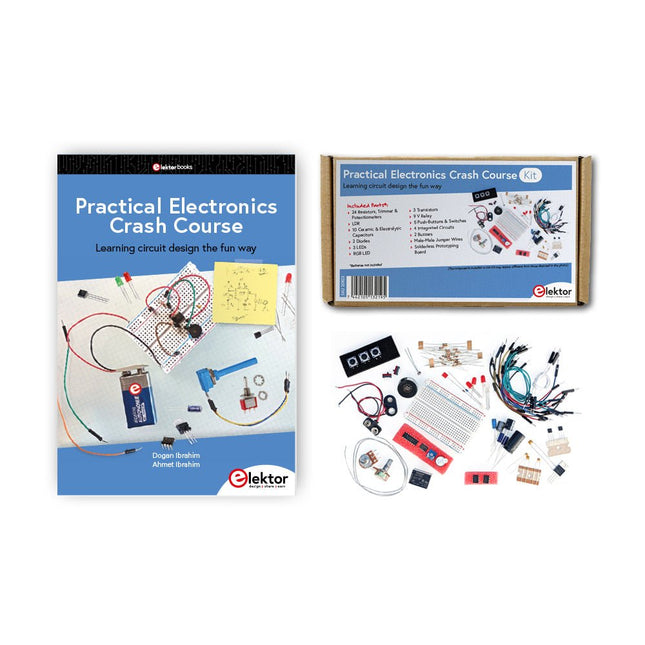
Getting started in electronics is not as difficult as you may think. With this bundle (book + kit of parts), you can explore and learn the most important electrical and electronics engineering concepts in a fun way by doing various experiments. You will learn electronics practically without getting into complex technical jargon and long calculations. As a result, you will be creating your own projects soon.
This kit contains the components required to build most of the detailed examples of the book on a breadboard and try them out for real.
The kit can, of course, also be used without the book for building other circuits and doing your own experiments.
Kit contents
1x 39 Ω, 1 W resistor
1x 47 Ω resistor
1x 180 Ω resistor
1x 330 Ω resistor
3x 1 kΩ resistor
1x 2.2 kΩ resistor
1x 3.9 kΩ resistor
1x 6.8 kΩ resistor
1x 10 kΩ resistor
1x 15 kΩ resistor
1x 22 kΩ resistor
1x 33 kΩ resistor
1x 47 kΩ resistor
1x 56 kΩ resistor
1x 82 kΩ resistor
1x 120 kΩ resistor
1x 680 kΩ resistor
2x 100 kΩ resistor
1x 10 kΩ trimmer
1x 10 kΩ linear potentiometer
1x 100 kΩ linear potentiometer
1x LDR
1x 1 nF ceramic capacitor
2x 10 nF ceramic capacitor
1x 100 nF ceramic capacitor
1x 1 µF, 25 V aluminium electrolytic capacitor
2x 10 µF, 25 V aluminium electrolytic capacitor
1x 100 µF, 25 V aluminium electrolytic capacitor
1x 470 µF, 25 V aluminium electrolytic capacitor
1x 1000 µF, 25 V aluminium electrolytic capacitor
1x RGB LED, Common-Cathode (CC)
1x 1N4148 small signal diode
1x 1N4733A 5.1 V, 1 W Zener diode
3x LED, red
2x BC337 NPN transistor
1x IRFZ44N N-channel MOSFET
2x NE555 timer
1x LM393 comparator
1x 74HCT08 quad AND gate
3x Tactile switch
2x SPDT switch
1x Relay, SPDT, 9 VDC
1x Active buzzer
1x Passive buzzer
50 cm Solid wire, 16 AWG, unjacketed
2x PP3 9 V battery clip
1x Breadboard
20x Jumper wire
This bundle contains:
Practical Electronics Crash Course Kit (valued at: €45)
Book: Practical Electronics Crash Course (normal price: €45)
Elektor GREEN en GOLD leden kunnen deze uitgave hier downloaden.
Nog geen lid? Klik hier om een lidmaatschap af te sluiten.
Wat is Edge-AI nu eigenlijk?Intelligentie naar het apparaat brengen
Maak kennis met Edge Impulse StudioEenvoudig Edge-AI modellen bouwen en implementeren
Keyword spotting met Edge ImpulseVerzamelen, trainen en implementeren
Slimme apparaten bedienen via spraakbesturing met de Nordic Thingy:53
Sleutelbegrippen voor het begrijpen van Edge AI en Machine Learning
Snelcursus: Aan de slag met Edge ImpulseLeer een ML-model te verzamelen, trainen en implementeren met de Arduino Nano 33 BLE Sense
Een nieuw hoofdstuk voor ArduinoVan hobbyboard tot Edge computing-krachtpatser
Aan de slag met objectdetectie op edge-apparaten
Detectie van defecten op printplatenComputer Vision met de Raspberry Pi
AI op maat maken voor de kleinste apparaten
Optimalisatie van het energieverbruik in batterijgevoede Edge-AI apparaten
AI ToasterWanneer Edge-AI en ontbijt samenkomen
Thundercomm Rubik Pi 3Raspberry Pi ervaring in combinatie met Edge AI
Leiderschap, Embedded ML en de Edge-revolutie
Vision language models voor EdgeModel-cascadering voor betere betrouwbaarheid
Maak kennis met Edge ImpulseVragen van de Elektor-community
Projectupdate #5: Energiemeter op basis van ESP32Edge-AI gebruiken voor herkenning van huishoudelijke verbruikers
Bewegingsherkenning met anomalie-detectieEen uitgebreide training
Slim ventilatiesysteem: integratie van geluids- en omgevingsgegevensEen machine learning toepassing met dubbele MCU voor geautomatiseerde bediening van ramen en lamellen
Spraakbesturing voor oordopjes en headsets
Edge-AI: de volgende generatie apparaten mogelijk maken
Die Kurzwellentechnik übt einen ganz besonderen Reiz aus. Man kann mit geringstem Aufwand große Entfernungen überbrücken. Durch Reflexion an leitenden Schichten der Ionosphäre und am Boden werden Kurzwellensignale auch an Orten jenseits des Horizonts hörbar. So lässt sich jeder Ort auf der Erde erreichen.
Zwar strebt die Technik nach immer höheren Frequenzen, und Radio hört man meist auf UKW, über DAB+, über Satellit oder das Internet. Aber alle diese moderneren Übertragungswege benötigen eine umfangreiche Infrastruktur und sind extrem verletzlich. Im Falle eines globalen Stromausfalls geht nichts mehr außer auf der Kurzwelle. Deshalb wird im Amateurfunk nicht nur ein Hobby gepflegt, sondern auch ein Notfunksystem aufrechterhalten.
Das Elektor SDR-Shield ist ein vielseitiger Kurzwellenempfänger bis 30 MHz. Zusammen mit einem Arduino-Board und der passenden Software lassen sich nicht nur Rundfunkstationen empfangen, sondern auch Morsesignale, SSB-Stationen und digitale Signale.
Der Erfolgsautor und begeisterter Amateurfunker Burkhard Kainka beschreibt im vorliegenden Buch die moderne Praxis des Software Defined Radios mithilfe des Elektor SDR-Shields.
Dabei vermittelt er nicht nur den theoretischen Background, sondern erklärt auch zahlreiche Software-Werkzeuge aus dem Open-Source-Bereich, die heute die Kurzwellentechnik zu einem absolut spannenden und hochmodernen Hobby machen.
Über 50 Schaltungen und Projekte
Sirene im US-Stil
Zwei Drehgeber an einem Analogeingang
Wie man mit dem Arduino einen 230-V-AC-Dimmer baut
Zehnfache LED-Stromquelle
Vier Schalter an einem Pin erkennen
Ein/Aus-Schalter mit Akku-Füllstandskontrolle
Handdesinfektionsmittel-Spender selbstgebaut
Eine einfache elektronische Orgel
Ultra-einfacher Stereo-Verstärker
Sound Activated Switch für Verstärker
Balanced/Unbalanced-Wandler
Externes Netzfilter
Tastenfreie Torsteuerung
DI-Box für ein Smartphone
Spaß mit Lauflichtern
Ein-Knopf-Thyristor-Steuerung
Quasi-analoger Belichtungstimer für die Dunkelkammer
Schaltungen von der Hackster.io-Community
Analoger Bräunungstimer
Noch eine Ein-Draht-LCD-Schnittstelle
Einfacher PWM-Generator mit ATtiny13
Zweites Leben für Batterien
Touch-Schalter für LED-Leuchten
Tester für LEDs und DIP-Schalter
Funktionstester für IR-Fernbedienungen
Leistungshalbleiter-Tester
SPI für WS2812(B)-LEDs
Messen von Leistungsinduktivitäten
Ein DIY-Doppelnetzteil
DIY-Testvorrichtung für das LCR-Meter
Arduino-Amperemeter
Zwei-Finger-Orgel
Rauscharmer ADC-Kalibrator
DC/DC-Aufwärtswandler
Zwei Potentiometer an einem digitalen Eingang
Akustischer Näherungssensor
Batterieloser Heizkörper-Sensor
Wanzen und drahtlose Kameras aufgespürt
Timer für die Innenbeleuchtung im Auto
Kerzensimulator
Digitaler Küchentimer
Milliohm-Meter
Verzögerungstimer für Heißwasserbereiter
Einfaches Ladegerät für zwei Zellen des Typs 18650
Winzige Frequenzreferenz
Sparsamer IR-Schalter
Recyceln Sie den Auto-Handylader!
Mikrofon-Vorverstärker für Arduino
EMI-Filter im Selbstbau
Elektronischer Würfel – ganz ohne MCU
Finger-Kondensator
Der selbstladende LED-Blitzer
Außerdem in dieser Ausgabe
KiCad 6 – Fünf interessante neue Funktionen
Flashback – Der Elektor-Computer SC/MP
Interview – Mit Elektrizität Kunst machen
Meine erste Platine – Crash-Einstieg in KiCad
Mit intelligenter Software Hardware minimieren
Infografik – Fakten und Zahlen
Neue ICs von Analog Devices
Flashback – DER Elektor-Metalldetektor
Hexadoku – Sudoku für Elektroniker
MOTORSTEUERUNG MIT H-BRÜCKENFür DC-, Schritt- und bürstenlose Motoren
DAS TEAM IM ELEKTOR-LABORUnser Ansatz, unsere bevorzugten Werkzeuge und mehr
RASPBERRY PI ALS KVM-FERNSTEUERUNGDie Software Pi-KVM im Elektor-Labor-Test
REVIEW: IQAUDIO CODEC ZEROEine Soundkarte für die Raspberry Pi Familie
DAS PIKVM-PROJEKT UND SEINE LEHRENEin Interview mit Maxim Devaev* (Entwickler von PiKVM)
AUTONOMES FAHRZEUG MIT 2D-LIDARESP32 Pico interpretiert die Daten des Lidar-Moduls
RASPBERRY PI ZERO 2 WEin erfreuliches und notwendiges Update
IMPRESSIONEN VOM WORLD ETHICAL ELECTRONICS FORUM 2021
MOTORSTEUERUNGWie die Motorsteuerung weniger kompliziert wird
GRÖSSERE ELEKTROMOTOREPrinzipien und Wissenswertes
ESP32-C3: 32-BIT-RISC-EINKERNEREin erstes Hands-on im Elektor-Labor
SCHÜTZEN SIE SICH SELBST UND ANDERE!Hauptnetzschalter für den Labortisch selbst gebaut
PROGRAMMIEREN IN PYTHONNickname-Generator mit grafischer Benutzeroberfläche
PRODUCTRONICA FAST FORWARD AWARD 2021: DIE PREISTRÄGER
VIELSEITIGER SERVO-TESTERServos ohne Datenblatt analysieren
MODBUS ÜBER WLANTeil 2: Software für das Modbus-TCP-WLAN-Modul
NEURONEN IN NEURONALEN NETZEN VERSTEHENTeil 3: Praktische Neuronen
IM INNEREN EINES OPEN-SOURCE-PROZESSORSEin Beispiel-Kapitel: Lattice- und Xilinx-FPGAs im Vergleich
ALLER ANFANG ...muss nicht schwer sein: Die Spule lässt uns nicht los!
PROJEKT 2.0Korrekturen, Updates und Leserbriefe
COLOR TO SOUNDWie man einen Farbsensor über I2C ausliest
BATTLAB ONEBetriebsdauer von batteriebetriebenen Geräten messen und optimieren!
EINFACHER ERDSCHLUSSPRÜFERIsolationstester für Netzspannungsinstallationen
ARMUT UND ELEKTRONIK1. Ziel für nachhaltige Entwicklung
HEXADOKUThe Original Elektorized Sudoku
Elektor GREEN en GOLD leden kunnen deze uitgave hier downloaden.
Nog geen lid? Klik hier om een lidmaatschap af te sluiten.
OBD2-sensordashboardOude meters vormden het startpunt van een zoektocht naar echte gegevens
OBD2: voeg een toerenteller en schakelindicator toe aan je autoRetro, maar uiterst nuttig
LiDAR- en Visiesensoren voor Robotica
Sensor+Test 2025 en PCIM 2025
Contactloze E-Veldmetingen (1)Een Trillende Membraan voor het Detecteren van Gelijkspanningen of Statische Elektrische Velden
Draadloze brievenbusmeldervan optische sensoren tot radar: enkele mogelijkheden
Elektor Mini-Wheelieeen zelfbalancerende robot
ZonnecellenVreemde onderdelen, de serie
Aan de slag met een moderne radarsensorStaat een nauwkeurige meting op uw radar?
Uit het leven gegrepenpapierfabriek
CybersecurityZware tijden voor hackers
Infographics: IoT en sensoren 2025
Bluetooth 6.0 brengt verbeterde toepassingen voor afstandsbepalingNieuwe versie biedt betere apparaatpositionerings- en -locatieservices
Draadloze communicatie verkennen met BeagleY-AI
Err-lectronicsCorrecties, updates en lezerspost
Alle begin......sluit het thema opamps af
Een krachtige AI-codeerassistentsneller ontwikkelen met Continue en Visual Studio Code
Zonne-laadregelaar met MPPT (2)Het schema
Ultrasone obstakeldetectoreen eenvoudig project om slechtzienden te helpen
2025: Een AI-odysseeHalfjaaroverzicht
Raspberry Pi Standalone MIDI-synthesizer (3)Het slimmer maken en een gebruikersinterface toevoegen
Meshtastic: een demonstratieprojectEen slim netwerk van LoRa-radio's
Analoge audio-frequentiegeneratorHoogwaardige sinusgenerator met instelbare frequentie
Le téléchargement intégral de ce numéro est disponible pour nos membres GOLD et GREEN sur le site Elektor Magazine !
Pas encore membre ? Cliquez ici.
petite caméra thermiqueréalisée avec un Arduino UNO
mise à jour du projet #3 : compteur d'énergie basé sur l'ESP32intégration et test avec Home Assistant
2024 : l'odyssée de l'IAaméliorer la détection d'objets : intégration de techniques avancées
Raspberry Pi se met à l'IAun nouveau kit comprenant un accélérateur IA matériel et un adaptateur M.2 HAT+
capteurs de stations météorologiqueslequel choisir ?
Relevé des compteurs d'eau basé sur l'IA (1)intégrez votre ancien compteur dans l'IdO !
une alarme GSMun module GSM protège votre garage à distance
optimisation et contrôle des appareils Thread à faible consommation d'énergiefaible consommation... peu d’effort ?
sur le vifmontrez-moi là où ça fait mâle
chambre à brouillard à faire soi-mêmevisualiser les rayonnements invisibles
SparkFun Thing Plus Mattercarte de développement IdO polyvalente basée sur Matter
Rétroéquipement IoTAdaptation des machines à interface RS232 à l'industrie 4.0
ajouter l’IoT grâce aux microcontrôleurs 8 bits
la technologie au service du développement durableles avancées technologiques favorisent une utilisation plus efficace de l’énergie dans de nombreuses applications
AWS pour Arduino et Cie. (1)utiliser AWS IoT ExpressLink en pratique
détecteur de flux d'air Arduinoaucun capteur externe n'est nécessaire !
détecteur de fuite d'eauconnecté à l’Arduino Cloud
le quartzdrôle de composant, la série
enregistreur universel de données de jardinageun pas vers l’Intelligence Artificielle au Jardin.
un générateur analogique 1 kHzondes sinusoïdales à faible distorsion
Miletus : utiliser les applications Web hors ligneaccès aux fonctions de l’appareil et du système
de la 4G à la 5Gest-ce une étape si facile à franchir ?
démarrer en électronique…connexions symétriques
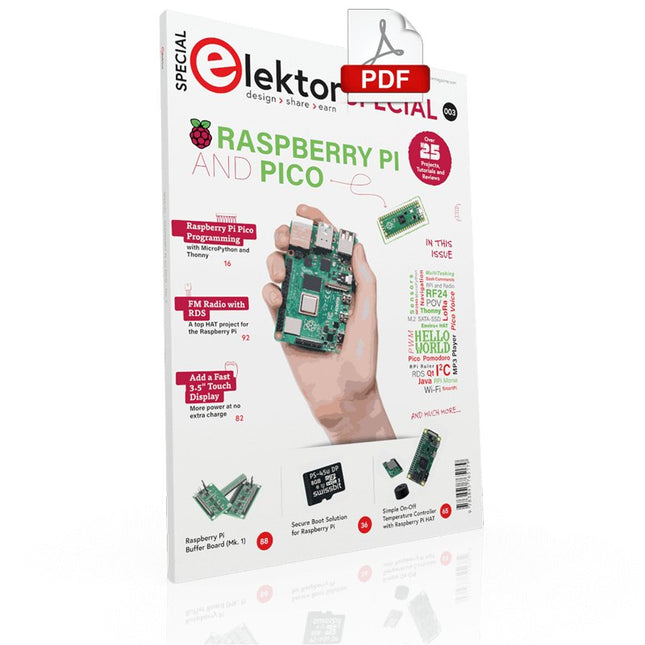
Contents
Projects
PicoVoiceVoice alienation and sound effects with the Raspberry Pi Pico
Navigation with Vibration Feedback
POV Display
Pulse Width Modulation (PWM) with the Raspberry Pi Pico
Wi-Fi with the Raspberry Pi Pico
'Hello World' from the Raspberry Pi Pico and RP2040A look at the Raspberry Pi Foundation’s first microcontroller
Simple On-Off Temperature Controller with Raspberry Pi HAT
Multitasking with the Raspberry PiShowcase: a traffic lights controller
The Raspberry Pi Ruler GadgetFun with a time-of-flight sensor
Raspberry Pi Buffer Board (Mk. 1)Never blow up the I/O again
FM radio with RDSA top HAT project for the Raspberry Pi
LoRa with the Raspberry Pi PicoFun with MicroPython!
Tutorials
Qt for the Raspberry Pi
Raspberry Pi Pico Programmingwith MicroPython and Thonny
Raspberry Pi Full StackRPi and RF24 at the heart of a sensor network
Raspberry Pi Bash Command Cheat Sheet
Community
Java on the Raspberry PiAn interview with Frank Delporte
Reviews
Introducing the New Raspberry Pi Pico W, H, and WH
Secure Boot Solution for Raspberry PiRetrofit security at a reasonable price
Review: SmartPi – Smart Meter Extension for Raspberry Pi
Review: The Enviro+ Raspberry Pi HATMeasuring environmental data with Raspberry Pi and the HAT Enviro+
Review: Meet the Raspberry Pi 4All new but still good?
Raspberry Pi Gets a Fast 3.5' Touch DisplayMore power at no extra charge
Book Launch: Raspberry Pi for Radio Amateurs
Projects with Arduino, ESPHome, Home Assistant, and Raspberry Pi & Co.
This e-book contains various example projects, beginning with an introduction to electronics. It also explains how to install Home Assistant on a Raspberry Pi, how to use indoor climate sensors for temperature and humidity, how to implement the MQTT protocol and other interfaces, and how to use ESPHome to integrate sensors and actuators into Home Assistant. Numerous video tutorials complement the book.
Fundamentals of electrical engineering
The book begins with an introduction to electrical engineering. You will learn the basics of voltage, current, resistors, diodes and transistors.
Arduino and microcontrollers
A complete section is dedicated to the Arduino Uno. You will get to know the structure, write your first programs and work on practical examples.
Home Assistant and automation
You will learn how to set up Home Assistant on a Raspberry Pi and how to use automations, scenes and devices. In addition, Zigbee, MQTT and ESP-NOW – important technologies for home automation – will be discussed.
ESP8266, ESP32 and ESP32-CAM
The popular ESP microcontrollers are covered in detail. A theoretical introduction is followed by practical projects that show you how to get the most out of these devices.
Sensors and actuators
The book explains the functionality and application of numerous sensors such as temperature and humidity sensors, motion detectors and RFID readers. For actuators, stepper motors, e-ink displays, servo motors and much more are covered. There are practical application examples for all devices.
ESPHome
This chapter shows you how to integrate sensors and actuators into Home Assistant without any programming effort. You will be guided step by step through the setup with ESPHome.
LEDs and lighting technology
In this chapter, you will learn about different types of LEDs and how they can be used. The basics of lighting technology are also explained.
Node-RED
A whole chapter is dedicated to Node-RED. You will learn the basics of this powerful tool and be guided step by step through its setup and use.
Integrated Circuits (ICs)
In electronics, there are numerous ICs that make our lives easier. You will get to know the most important ones and apply your knowledge in practical projects.
Professional programming
Advanced topics such as the correct use of buttons, the use of interrupts and the use of an NTP server for time synchronisation are covered in detail in this chapter.
Downloads
GitHub